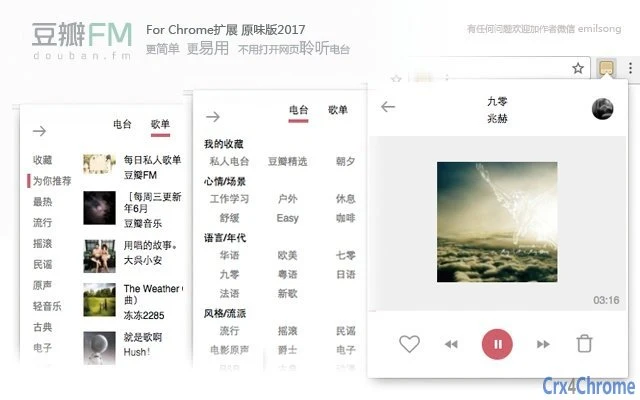

Download 豆瓣FM电台 Chrome扩展 – Music Player, Online Radio
The 豆瓣FM电台 Chrome extension allows users to enjoy music streaming directly from the browser without opening the full website. Designed for music lovers who value convenience and simplicity, it enables seamless playback of personalized radio stations, curated playlists, and favorite tracks. The tool is ideal for users seeking a lightweight, efficient way to access content from the popular Chinese music platform.
With support for offline-like functionality through browser notifications and quick controls, it enhances daily listening experiences. Real-world usage includes background music during work, commuting, or study sessions. The developer did not provide additional system requirements.
Platform compatibility information is limited to the supported operating systems.
Key Features & Capabilities
- Background Playback – Stream music from 豆瓣FM without keeping the browser tab open, enabling uninterrupted listening during multitasking.
- Quick Controls – Use keyboard shortcuts to navigate tracks (next, previous), control playback (play/pause), adjust volume, and manage repeat settings.
- Red Heart & Blacklist Management – Easily mark songs as favorites or block disliked tracks using dedicated buttons or keyboard shortcuts.
- Personalized Radio Stations – Access private radio, favorite stations, and curated playlists based on user preferences and listening history.
- Playlist & Collection Support – Browse and play saved playlists, including “My Favorite Playlists” and “My Favorite Stations.”
- Enhanced Display Features – Show song titles prominently, support for lyrics display, and browser notifications with current track info.
- Progress Bar & Volume Control – Adjust playback position and volume directly through the extension interface for greater control.
- Compatibility with HTTPS – Updated to work properly after 豆瓣FM’s transition to secure connections, ensuring stable access.
Workflow Efficiency
The extension integrates seamlessly into the Chrome browsing environment. Once installed, users can activate playback with minimal interaction. The interface remains compact, minimizing screen clutter while delivering essential controls. Navigation between tracks and station management is intuitive, relying on keyboard shortcuts and a clean layout. Users can switch between different radio types—such as personal recommendations, genre-based stations, or curated playlists—without leaving their current workflow. The developer did not specify resource usage details, but the small file size suggests low memory footprint. Performance observations are based on general software behavior patterns.User Interface, Workflow & Performance
The user interface is minimal and focused on functionality. The extension presents a compact panel with playback controls, song title display, and basic navigation options. The design prioritizes accessibility, allowing users to interact with the player without distraction. Controls are logically grouped: playback actions, volume adjustment, and song management are positioned for quick access. The interface supports keyboard shortcuts, enhancing efficiency for frequent users. Navigation through playlists and stations is straightforward, though no advanced search or filtering tools are mentioned. The developer did not specify resource usage details. Stability appears consistent across updates, with recent versions addressing known bugs related to playback and display. Performance observations are based on general software behavior patterns.Compatibility & System Requirements
The extension is compatible with Windows, Mac, and Linux operating systems, supporting the Chrome browser environment. It has a file size of 1.2 MB, indicating a lightweight installation. The software version is 5.4, released on September 1, 2017. Exact system requirements were not listed. Compatibility information was partially provided. No specific hardware specifications are mentioned. The developer did not provide additional system requirements.Pros and Cons
- Lightweight and fast to install
- Supports background playback without tab open
- Intuitive keyboard shortcuts for control
- Preserves favorite stations and playlists
- Updated to work with HTTPS-enabled 豆瓣FM
- Compact interface with minimal distractions
- Includes red heart and blacklist features
- Latest update was in 2017, may lack modern Chrome compatibility
- No official support for mobile or other browsers
- File size and version suggest limited ongoing development
- No detailed documentation or user guide provided
- Dependent on third-party service (豆瓣FM) for content
FAQ Section
Is the 豆瓣FM电台 Chrome extension free to use?
The extension is available at no cost. It does not require a paid subscription or in-app purchases.
Does the extension work on all operating systems?
It is compatible with Windows, Mac, and Linux, provided the Chrome browser is installed.
Can I use the extension without being logged in to 豆瓣FM?
Some features, such as saving favorite stations or accessing personal playlists, require a 豆瓣FM account.
Is the extension safe to install?
As a Chrome extension from a third-party developer, it should be installed from the official Chrome Web Store. Users are advised to review permissions before installation.
Does the extension support offline listening?
There is no built-in offline mode. Playback requires an active internet connection to stream content from 豆瓣FM.







